
1-First you need a source in mp3 and ogg.here you came find a online converter http://media.io/
2-Jquary is needed
http://ajax.googleapis.com/ajax/libs/jquery/1.4/jquery.min.js
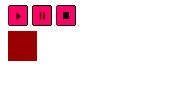
3- create a progress bar with css
.position {
position:static;
left: 0px;
z-index: 0;
width: 0%;
background: #990000;
height: 30px;
margin-top: 0px;
}
.controls {
width: 500px;
}
4- create a div in the html.
<div class=”controls><div class=”position” style=”width: 0%; “></div></div>
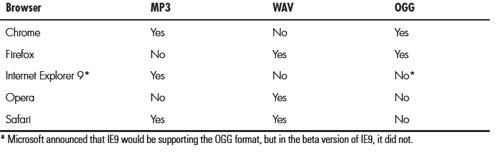
5-Create the audio tag new for html5 in this case try to use the autoplay and id audio-player and three buttons play,pause and stop whit Id.You need a litle trick for all source you need mp3 ,ogg ,wav and for IE8 a swf its a solution.
<div id=”nowPlaying”><audio id=”audio-player” name=”audio-player” autoplay>
<source src=”jazz.mp3″ />
<source src=”jazz.ogg” />
<source src=”jazz.wav” />
<p>Your browser doesn’t recognize audio</p></audio>
<a id=”play-bt” href=”#”><img src=”images/play.png” alt=”||” /></a> <a id=”pause-bt” href=”#”><img src=”images/pause.png” alt=”||” /></a> <a id=”stop-bt” href=”#”><img src=”images/stop.png” alt=”||” /></a>
</div>
6-start a java Script with the function for the buttons , start used $Api to call the play and stop.And
$(‘.controls .position’).width(‘0%’) this star in 0 when you click stop.
$(“#play-bt”).click(function(){
$(“#audio-player”)[0].play();
})
$(“#pause-bt”).click(function(){
$(“#audio-player”)[0].pause();
})
$(“#stop-bt”).click(function(){
$(“#audio-player”)[0].pause();
$(“#audio-player”)[0].currentTime = 0;
$(‘.controls .position’).width(‘0%’);
})
7- update the event and calculate the progress with length of the sound
$(“#audio-player”)[0].addEventListener(‘timeupdate’, function(){
var length = this.duration;
var secs = this.currentTime;
var progress = (secs / length) * 100;
$(‘.controls .position’).width( (progress +’%’) );
},false);
This Is It