


Monthly Archives: June, 2011
Honrar la vida
Honrar la vida
¡No! ¡Permanecer y
transcurrir
no es perdurar, no es existir,
ni honrar la vida!
Hay tantas maneras de no ser,
tanta conciencia sin saber,
adormecida…
Merecer la vida no es callar
y consentir,
tantas injusticias repetidas…
Es una virtud, es dignidad
y es la actitud de identidad
más definida.
Eso de durar y transcurrir
no nos da derecho a presumir.
Porque no es lo mismo que
vivir…
Honrar la vida.
¡No! ¡Permanecer y transcurrir
no siempre quiere sugerir
honrar la vida!
Hay tanta pequeña vanidad
en nuestra tonta humanidad
enceguecida.
Merecer la vida es erguirse
vertical,
más allá del mal, de las caídas…
Es igual que darle a la verdad
y a nuestra propia libertad
la bienvenida…
Eso de durar y transcurrir
no nos da derecho a presumir,
porque no es lo mismo que
vivir…
Honrar la vida
My New Website 2011
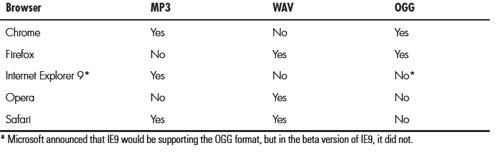
Browser: A Case Study
1-Google chrome 12.0.742.91. working fine.
2-Opera 11.01. minor issue
3-Safari 5.0.4. minor issue – canvas issue
4-Safari iphone minor issues-canvas issue
5-firefox 4.0.1 one. issue canvas issue
6-Internet Explorer 8. several issues html5 audio-section
Html5 Audio
1-First you need a source in mp3 and ogg.here you came find a online converter http://media.io/
2-Jquary is needed
http://ajax.googleapis.com/ajax/libs/jquery/1.4/jquery.min.js
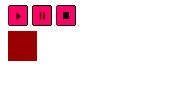
3- create a progress bar with css
.position {
position:static;
left: 0px;
z-index: 0;
width: 0%;
background: #990000;
height: 30px;
margin-top: 0px;
}
.controls {
width: 500px;
}
4- create a div in the html.
<div class=”controls><div class=”position” style=”width: 0%; “></div></div>
5-Create the audio tag new for html5 in this case try to use the autoplay and id audio-player and three buttons play,pause and stop whit Id.You need a litle trick for all source you need mp3 ,ogg ,wav and for IE8 a swf its a solution.
<div id=”nowPlaying”><audio id=”audio-player” name=”audio-player” autoplay>
<source src=”jazz.mp3″ />
<source src=”jazz.ogg” />
<source src=”jazz.wav” />
<p>Your browser doesn’t recognize audio</p></audio>
<a id=”play-bt” href=”#”><img src=”images/play.png” alt=”||” /></a> <a id=”pause-bt” href=”#”><img src=”images/pause.png” alt=”||” /></a> <a id=”stop-bt” href=”#”><img src=”images/stop.png” alt=”||” /></a>
</div>
6-start a java Script with the function for the buttons , start used $Api to call the play and stop.And
$(‘.controls .position’).width(‘0%’) this star in 0 when you click stop.
$(“#play-bt”).click(function(){
$(“#audio-player”)[0].play();
})
$(“#pause-bt”).click(function(){
$(“#audio-player”)[0].pause();
})
$(“#stop-bt”).click(function(){
$(“#audio-player”)[0].pause();
$(“#audio-player”)[0].currentTime = 0;
$(‘.controls .position’).width(‘0%’);
})
7- update the event and calculate the progress with length of the sound
$(“#audio-player”)[0].addEventListener(‘timeupdate’, function(){
var length = this.duration;
var secs = this.currentTime;
var progress = (secs / length) * 100;
$(‘.controls .position’).width( (progress +’%’) );
},false);
This Is It